• MUSIC
  • ARTISTS
  • DEMO
  • NEWS
  • CONTACT
  • VIDEOS

Tips

Beatport Introduces Greenroom to Help Artists and Labels Manage Their Digital Presence

July 22, 2026 by Alveda Music
Fresh News, Industry, Tips
beatport

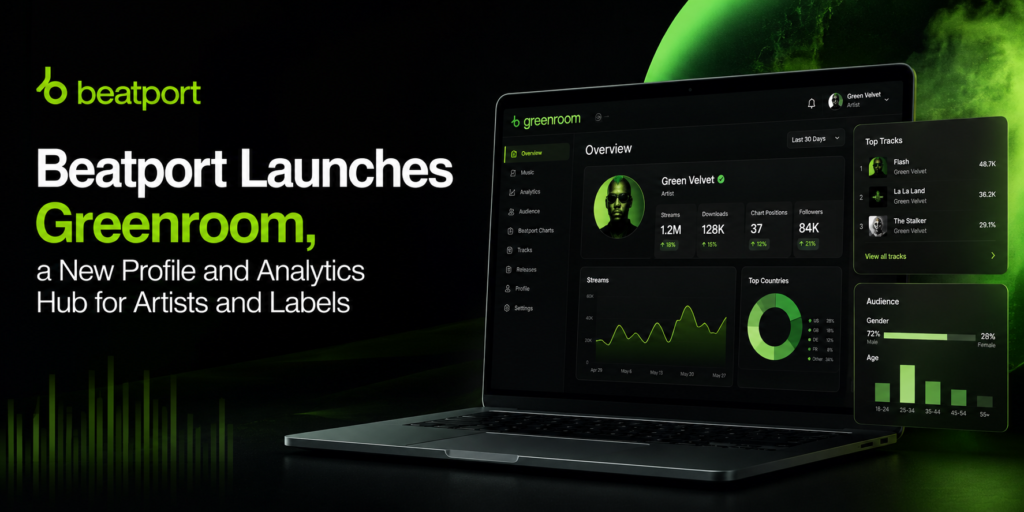
Beatport has launched Greenroom for Artists & Labels, a new free platform designed to give artists, labels, managers, and music teams greater control over their profiles, catalogs, analytics, and events on the platform.

The service is available to artists and labels whose music is already live on Beatport. It provides a centralized dashboard where users can update profile information, review performance data, manage team access, and promote events listed through Beatport Tickets.

Profile management and team tools

Through Greenroom, artists and labels can claim their official Beatport pages and keep their information current. Available profile tools include the ability to update biographies, replace profile images, add label logos, and manage other key details.

Users can also invite team members and assign different access permissions, making it easier for managers, label staff, and collaborators to work together on a profile.

The platform also gives users access to catalog information, including products available for download or streaming on Beatport.

Access to audience and performance data

One of the main features of Greenroom is its analytics dashboard. Artists and labels can view official data related to how DJs interact with their music, including download activity, DJ followers, and DJ streams.

These insights are intended to help users better understand catalog performance and identify how their releases are connecting with Beatport’s DJ audience.

Promote events through Beatport Tickets

Greenroom also connects artist and label profiles with Beatport Tickets. Users can add upcoming events to their Beatport pages, allowing followers and visitors to discover live performances alongside the artist’s latest releases and profile information.

Beatport Chief Commercial Officer Alex Branson said the launch is part of the company’s effort to become a stronger marketing partner for artists and labels.

According to Branson, Greenroom allows users to make better use of their profiles, connect with DJ followers, highlight live events, and gain insight into how DJs engage with their music.

How to get started

Artists and labels can access Greenroom by logging in with their Beatport.com account. They must then select whether they are claiming an artist or label profile and submit their request for approval.

Once the claim has been approved, users can begin managing their profile, viewing analytics, inviting team members, and adding Beatport Tickets events.

With Greenroom, Beatport is offering artists and labels a single place to manage their presence on the platform and gain a clearer understanding of their audience and catalog performance.

How to Create and Promote a Beatport Chart (Step-by-Step Guide)

June 2, 2026 by Alveda Music
Tips
beatport, promote, promotion

Creating a Beatport Chart is one of the simplest and most effective ways to promote your tracks, build visibility, and demonstrate industry credibility. Below is a clear, step-by-step guide—plus practical promotion strategies—to help you make your chart actually work for your release strategy.


How to Create a Beatport Chart

1. Log into Beatport

You’ll need a Beatport account connected to your Beatport DJ profile or label/artist page.

If you don’t have one, create a free account and make sure your artist profile is claimed and properly set up.


2. Go to “My Beatport”

Once logged in:

  • Click your profile icon
  • Select My Beatport
  • Find the Charts section in the menu
  • Click Create Chart

3. Add a Title, Description, and Cover Image

Presentation matters—well-designed charts tend to perform better.

Tips:

  • Title: Include your artist name and a theme (e.g., “Deep Grooves by DJ Solaris”)
  • Description: Add 1–2 sentences describing the vibe or purpose (e.g., “Tracks that inspired my latest release on XYZ Records.”)
  • Cover Image: Use a clean, professional square image. Artist photos or release artwork usually work best.

4. Select Your Tracks (10–20 Tracks)

Beatport requires a minimum of 10 tracks.

You can include:

  • Your own new release(s)
  • Tracks from artists you admire
  • Influences or complementary records

Tip: Place your own track at #1 for maximum visibility.


5. Publish Your Chart

Once everything is ready, click Publish.

Your chart will appear:

  • On your Beatport profile
  • In Beatport’s Charts section
  • On your Beatport artist page under “Charts”

How to Promote Your Beatport Chart

Creating the chart is only the first step—promotion is what drives traffic, streams, and sales.


1. Share Across Social Media

Promote your chart link across all major platforms:

  • Instagram Stories (use link sticker)
  • Facebook and Threads
  • TikTok (e.g., “Music I’m playing this month”)
  • X (Twitter)

Tip: Create short video clips mixing or previewing a few tracks from your chart.


2. Add It to Your Link-in-Bio

Add your chart to tools like Linktree, Beacons, or your personal website.

Example button:
“Beatport Chart – My Top Tracks of the Month”


3. Send It to Your Email List

If you have a fanbase or DJ promo list, send a short update:

  • Announce your new release
  • Mention it’s featured in your curated chart
  • Invite subscribers to check it out

4. Tag Other Artists

When sharing your chart, tag the producers included in it.

Many will reshare your post, giving you immediate exposure to their audience.


5. Share in DJ Communities

Post your chart in relevant communities such as:

  • Discord DJ servers
  • Facebook DJ groups
  • Reddit communities (e.g., r/Beatmatch, r/Techno, where appropriate)
  • WhatsApp DJ networks

6. Use It in Press Kits

Blogs, promoters, and bookers value curated content.

Include your Beatport chart in your Electronic Press Kit (EPK) as:

  • Social proof of taste and curation
  • Supporting content for press features
  • Promotional material for shows and releases

Pro Tips to Make Your Chart Perform Better

  • Release a chart on the same day as your track drop
    This boosts visibility and helps drive immediate traffic.
  • Create one chart per month
    Consistency improves algorithmic visibility and strengthens your artist presence.
  • Use themed concepts people can connect with:
    • “Festival Weapons 2025”
    • “Minimal Tech House Essentials”
    • “Tracks I Played at XYZ Club”
  • Collaborate with another DJ
    Shared charts double exposure by tapping into both audiences.

We discover. We release. We elevate.

- Empowering electronic artists worldwide -
Releases • Artist support • Collaboration

Follow Us


LARGEST CATALOG – EDM LABEL IN GREECE. WITH OVER 4000 SONGS RELEASED & 1200 ARTISTS INVOLVED.

2026 © ALVEDA MUSIC –  All Rights Reserved